


Latest EPA Libraries
Release Date: Oct 6, 2026 Subscribe to RSS notifications of changes to this pageYou can now upgrade EPA libraries on a NetScaler Gateway appliance to ensure that your appliance checks for the latest firewalls, antivirus, and so forth.
Upgrading EPA libraries eliminates the need to upgrade your NetScaler Gateway appliance solely to update the EPA libraries.
Note: The upgrade of EPA libraries is facilitated from the release build 12.0 57.19 and above.
Please refer to the notes in the product documentation page.
In a Citrix Gateway high availability, the EPA Libraries must be upgraded on both the primary and secondary nodes.
In a Citrix Gateway clustering setup, the EPA Libraries must be upgraded on all the cluster nodes.
How to Upgrade EPA Libraries on a NetScaler Gateway Appliance
Before you upgrade the EPA libraries you must have the upgrade files (tar zip format) uploaded on your local machine or on the NetScaler Gateway appliance.
Perform the following steps on the Citrix Gateway GUI to upgrade the EPA libraries:
1. Navigate to Configuration > Citrix Gateway > Upgrade EPA Libraries or EPA/VPN plugins.
2. From the Choose File drop-down menu, select the source for the upgrade file (local or appliance).
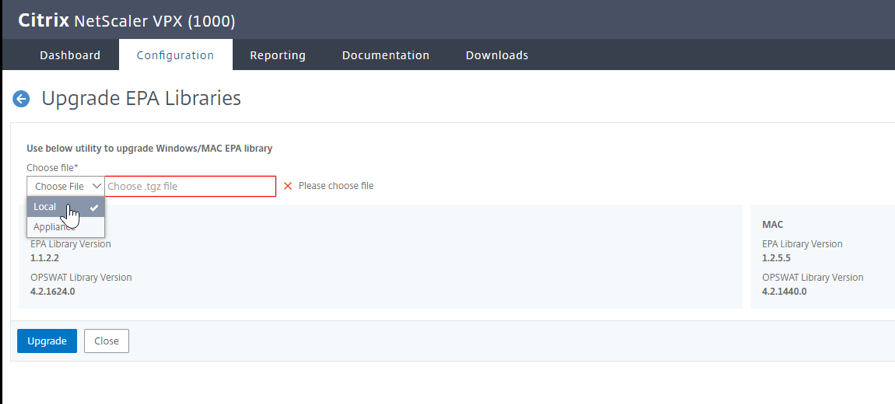
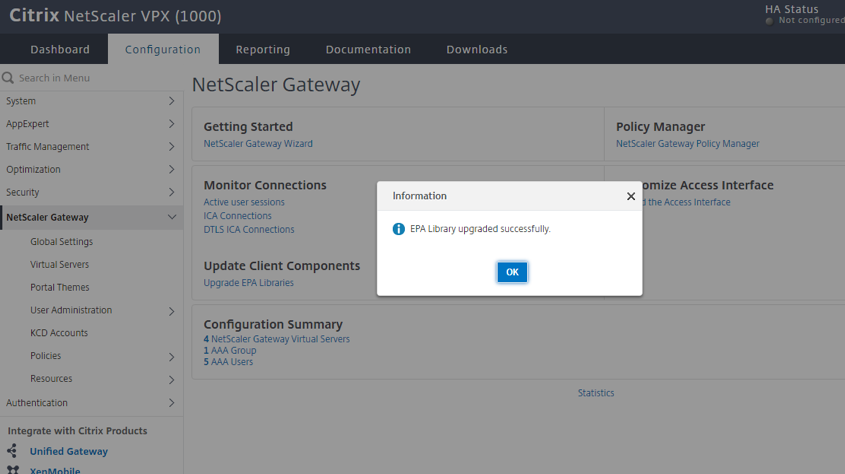
3. Navigate to the file to select the file and click Upgrade. Upon successful upgrade, the following screen appears:
EPA Libraries for Windows
Windows EPA Library Version -26.10.1.1 [win_epa.tgz]
Opswat Version -4.3.6685.0 , EPA Library Version - 26.10.1.1
Checksums- SHA-256 - d13920d18e319bd8cf4755fc6ac7c2a95e5fbe276f87a53f4aaf3088f716fcc0
Windows EPA Library Version -26.9.1.1 [win_epa.tgz]
Opswat Version -4.3.6525.0 , EPA Library Version - 26.9.1.1
Checksums- SHA-256 - adb06cd5a9ec785b497f63a99789402fe44e24394fd04b3b1b03160ec825e202
Windows EPA Library Version -26.8.1.1 [win_epa.tgz]
Opswat Version -4.3.6404.0 , EPA Library Version - 26.8.1.1
Checksums- SHA-256 - b39664b94501d3d95163b78e884c35d64989c48091d737324eb1b605342edbb9
Windows EPA Library Version -26.7.1.7 [win_epa.tgz]
Opswat Version -4.3.6344.0 , EPA Library Version - 26.7.1.7
Checksums- SHA-256 - f54d4d958af60b1c90ec134564cfb0fb2e0e8fd6f1bcf3383177469dfb95d226
Windows EPA Library Version -26.6.1.1 [win_epa.tgz]
Opswat Version -4.3.6166.0 , EPA Library Version - 26.6.1.1
Checksums- SHA-256 - efa9c4d47502685661303c0b981c432fb400ec7b9e7a70f17a3438a57d722680
EPA Libraries for Mac OS X
Mac OS X [Opswat version - 4.3.5435.0]
- SHA-256 - aece2a3678dcbcf06e6880e96589cc42e88081de6a27cd01c0fe821b623d21d8
Mac OS X [Opswat version - 4.3.5341.0]
- SHA-256 - 3bd6164f787cdf5d49b17a32fadb9ccb135ac4602d72f25e3ecf124ee4b844e9
Mac OS X [Opswat version - 4.3.5156.0]
- SHA-256 - 598f83b9e70d31eda2f538482e573caab7557840c8da169517d5ae5fbbb168eb
Supported Scan Matrix by OPSWAT v4
| Release Date | Windows OS Specific | MAC OS Specific | ||
|---|---|---|---|---|
| - | - | - | 4.3.5156 | Supported application list (.xlsx) |
| - | - | - | 4.3.5341 | Supported application list (.xlsx) |
| - | - | - | 4.3.5435 | Supported application list (.xlsx) |
| Jun 11,2026 | 4.3.6166 | Supported application list (.xslx) | - | - |
| Jul 20,2026 | 4.3.6344 | Supported application list (.xslx) | - | - |
| Aug 06,2026 | 4.3.6404 | Supported application list (.xslx) | - | - |
| Sept 10,2026 | 4.3.6525 | Supported application list (.xslx) | - | - |
| Oct 06,2026 | 4.3.6685 | Supported application list (.xslx) | - | - |