
The future interface for knowledge workers is AI. I don’t mean an AI-powered app, or AI assistants embedded in your existing tools. I mean the AI platform itself will be the primary way workers interact with their apps, data, and digital work environment. Everything else will become infrastructure that AI operates on the worker’s behalf.
I know how that sounds like naive futurism from someone who doesn’t get enterprise realities. But I’ve been doing this for over 30 years, so let me walk through the specific steps that get us there, all within your existing enterprise constraints. This isn’t about some distant AI-native future. It’s about AI becoming the broker between workers and the enterprises systems you already have which aren’t going away anytime soon.
The AI platform is already the gateway
When I talk about AI platforms, I mean ChatGPT, Claude, Gemini, Copilot, or similar tools. Calling these mere “chatbots” is comically inaccurate in 2025. They’re extensible platforms with connectors, code execution, file manipulation, browser control, voice modes, memory, and scheduling. They’re well on their way to becoming THE gateway through which workers access their work.
In my talks, I use the following diagram to show what this will look like. The workers use the AI platform, which in turn connects back to the apps or data in whichever way it needs:
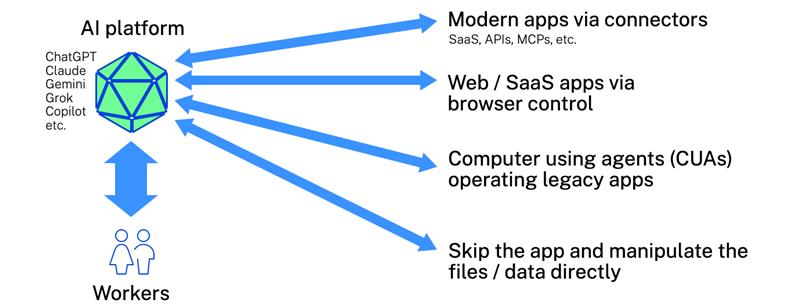
Modern apps via connectors
Today’s AI platforms connect directly to SaaS apps through APIs, MCP servers, and native integrations, including Gmail, Slack, Salesforce, Google Drive, calendars, project management tools, the Microsoft Graph, and countless others. When a worker asks their AI to schedule a meeting, pull last quarter’s sales data, or update a customer record, the AI talks directly to those systems, with no human clicking required. This is real today.
Web apps via browser control
For web apps that don’t have connectors, AI can just operate the browser instead. Literally. Almost every AI platform and browser support some form of this today. The AI can navigate, click, fill forms, and extract information from any web interface. The AI processes the DOM, understands the UI, and operates it like a human would. This is real today.
Legacy apps via computer-using agents
For desktop applications that aren’t web-based and don’t have APIs, AI can operate them directly. Computer-using agents (CUAs) see the screen, move the mouse, and press keys just like a human. CUAs now score around 70% (and improving quickly!) on standardized desktop using benchmarks, which is essentially human parity. This is real today.
Direct file and data manipulation
And finally, for many file types, AI doesn’t need the application at all. Excel, Word, PowerPoint, PDFs, images, code files, JSON, CSV, and dozens of other formats can be read, modified, and saved without ever launching the associated application. Apps have always just been middleware allowing humans to read and manipulate data. AI doesn’t need that middleware. This is real today.
We actually demoed this in our talk at Microsoft Ignite a few weeks ago. You can just ask your chatbot (err, “AI platform”) to create a visualization from a data feed and get a fully working app-like interface within minutes. This isn’t even “vibe coding,” it’s just explaining what you want to your AI. This is real today.
“But AI is unreliable!”
People understandably push back on this vision. “AI makes mistakes. It hallucinates. It’s not smart enough to be my primary interface to everything.”
Fair. If I told you AI was going to automagically develop your entire content strategy for next year with one button press, you’d be right to be skeptical. That’s asking AI to do hard cognitive work that requires judgment, context, and creativity.
But that’s not what AI-as-interface means.
Instead, consider a simple request: “Open that Word doc Shawn sent me yesterday.” This isn’t asking AI to think strategically. It’s asking AI to do basic pattern matching and retrieval: What was yesterday? Who did I interact with? Here’s Shawn. Which of his messages included a Word doc? That’s probably the one. Open it.
This kind of task is well within what AI handles reliably today. And it turns out that a huge portion of our daily interaction with enterprise systems is exactly this kind of simple orchestration and navigation: Finding things. Opening things. Moving data from here to there. Scheduling. Reminding. Summarizing what just happened.
AI-as-the interface doesn’t mean everything becomes AI slop. It means AI handles the brokering and navigation layer while you still bring judgment to the actual work. The AI finds Shawn’s doc, but you decide what to do with it. The AI pulls last quarter’s numbers into a summary, then you interpret what they mean. The AI drafts a response based on your previous emails, and you decide if it captures what you actually want to say.
This distinction matters because it changes the question from “Is AI smart enough to do my job?” to “Is AI reliable enough to handle the simple stuff so I can focus on the hard stuff?” And the answer to that second question is increasingly yes.
The shift will be so gentle you won’t even notice
Workers won’t consciously choose to “use AI instead of apps.” Like most technology transitions, it won’t feel like a decision at all.
Initially, (today), AI is just another app alongside every over app. A worker uses Word, Outlook, Salesforce, and now Claude or ChatGPT. They use AI instead of the native app for the simple low-stakes tasks: find that document, summarize this email thread, remind me about this tomorrow.
Once AI proves to be reliable at those simple things, workers will try slightly harder things: Analyze this spreadsheet. Research these competitors. Draft a response to this customer complaint. Each time AI handles the task without the worker needing to touch the underlying app directly, their muscle memory is reinforced to go to the AI rather than the native app.
As AI earns trust on easy tasks, the boundary of “what AI can handle” keeps expanding. This isn’t because AI suddenly got smarter, but because the worker’s confidence grew through accumulated experience. Once they’ve seen AI handle a hundred simple tasks without screwing up, they’ll try the hundred-and-first that’s a little more complex.
Over time, the proportion shifts: more time interacting with AI, less time operating apps directly. Eventually the worker will need to do something more complex in Excel, and as they’re waiting for it to load, they’ll realize “Wow, I haven’t opened Excel in two months!”
This is how the transition actually happens. It’s not a sudden replacement, but a gradual expansion of trust. (Just like how our initial trust and use of ChatGPT grew over time.) The apps dissolve into back-end infrastructure that AI operates rather than interfaces that humans use. It happens so slowly that by the time you notice, you’re already most of the way there.
“But I don’t want to talk to my computer!”
Whenever I share this vision, I get pushback like, “I don’t want to talk to my computer all day” or, “I like my apps” or, “I don’t want some AI deciding how I interact with my work!”
I agree! But this type of resistance is based on the limitations of today’s technology, not what’s coming.
Think about how computing interfaces have evolved. The first computers used toggle switches, then punch cards, command lines, GUIs with mice & keyboards, GUIs with multi-touch, then voice assistants. Each transition felt strange and limiting to people comfortable with the previous paradigm. (I will admit to being a CrackBerry user who thought the iPhone was dead on arrival due to its lack of a physical keyboard.)
As I write this in late 2025, we’re in the text-and-voice phase of AI interaction. But this primitive state is not the end state.
In the mature version of this world, AI will present whatever interface makes sense for that worker, for that task, at that moment. Want to use a keyboard and screen? The AI will render what you need there. Prefer voice while you’re walking your dog with earbuds? It’ll handle that. Need to review a complex document on your laptop? The AI will generate the appropriate view. Want to approve something quickly on your phone? Boom, done.
In the future, any UI elements workers need will be generated by AI, on demand, personalized to their preferences and adapted to their available devices. If you like apps, AI will present app-like interfaces. If you prefer conversational interaction, the AI will talk to you, using whatever avatar or visual representation you want. The AI will adapt to you, not the other way around.
Doubling down on the realities of the enterprise
As I mentioned in the opening, I’ve been working in enterprise IT for over 30 years and have many gray hairs. I’m not a wide-eyed youngling who naively thinks enterprises can just rip and replace their application stacks with AI-native alternatives. I understand that critical business processes run on legacy systems that aren’t going anywhere. I understand procurement cycles, compliance requirements, change management, and organizational inertia. I understand that your ERP system was customized fifteen years ago by consultants who are long gone, and it still works, and nobody wants to touch it.
This is why I’ve been building the vision where AI enters the existing world of the enterprise, rather than the enterprise “transforming” for some AI-is-a-magic-black-box future.
Six months ago, I outlined my 7-stage roadmap for human-AI collaboration which shows how this progression happens on a worker-by-worker basis within your existing enterprise environment. Workers start with (1) simple prompt-and-paste, then (2) deeper text and doc-based collaboration. (3) AI gains ambient awareness of their screen before it begins (4) operating the computer on their behalf. (First with their supervision, then (5) on its own in an agentic way.) Next, (6) multiple agents coordinate, before (7) AI starts orchestrating large-scale workflows while humans provide strategy and judgment.
At every stage, the workspace still exists. Apps, data, identity, security, and context come together with a control plane to manage & secure it all. The legacy systems don’t get replaced; they just get operated by AI instead of humans. The existing governance and security infrastructure doesn’t become obsolete; it gets extended to cover AI workers alongside human workers.
This is how AI becomes the interface without requiring you to rebuild your enterprise from scratch. The AI works with what you already have. Your job is to provide the secure, governed environment where this can happen safely.
My bottom line
The primary human interface for knowledge work is shifting from apps to AI platforms. This doesn’t mean apps disappear. It means they recede into infrastructure that AI operates on workers’ behalf. Workers will still occasionally open an app directly, just like I occasionally open a terminal or edit a config file. But for most knowledge work, the AI will be in the middle, accessing systems through whatever pathway makes sense, and presenting results in whatever format the worker needs at that moment.
This is how we think about the workspace at Citrix. It’s not just a delivery mechanism for apps, but the governed environment where human and AI workers get things done. Whatever AI platforms your workers end up using, whatever pathways those platforms take to reach your applications and data, the workspace remains the consistent layer of governance underneath.
The interface will keep evolving. The need for secure, governed access to enterprise resources doesn’t change.
Read more & connect
Join the conversation and discuss this post on LinkedIn. You can find all my posts on my author page (or via RSS).