
Exclusive access mode: One more option to handle user profiles in CPM containers
This blog was co-written by Liang Yang and Shuxiang Zhou, Citrix.
User profiles are a key concept in a successful VDI/DaaS deployment, and Citrix Profile Management provides flexible options to help Enterprise IT teams achieve that. In the Citrix Profile Management 2308 release, we introduced exclusive access mode for profile containers, which is designed for single-session desktop use cases.
In the modern DaaS/VDI workspace, multitasking is common. End users may need access to a desktop with generic purpose while also requiring access to privileged applications for their day-to-day work. Citrix DaaS and VDI make this possible by supporting concurrent access to multiple resources. This concurrent access also needs a strong integration with file-based profile roaming. At the same time, there is an increasing adoption of container technology. How can Citrix Profile Management support containers or container-based solutions,and how do we handle these scenarios? Let’s explore the options Citrix Profile Management provides.
Multi-session access mode
There is a common set of scenarios in DaaS/VDI where the end users have a primary working resource and a set of supplementary resources, such as double hop access. In this use case, most user changes occur in the primary desktop. For other resources delivered by “double hop” desktops or applications, the only requirement is to load personalized user settings, such as browser bookmarks and input methods with no need to save modifications. The multi-session access mode is well-suited for this use case.
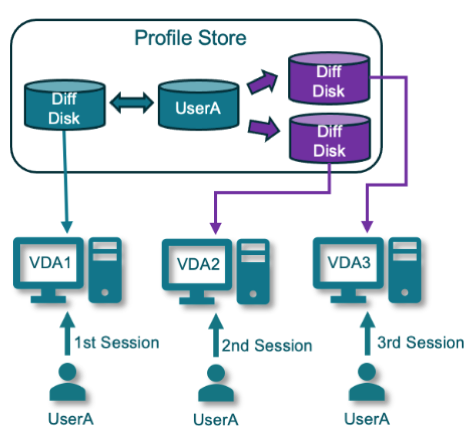
By default, CPM profile containers support concurrent user access, allowing a single user to access profile data simultaneously from any VDAs they log into. However, it’s important to note that only one session (read/write mode) can write data changes to the profile store, while changes in other concurrent sessions (read-only mode) are discarded upon user logoff. Each user session requires exclusive mounting of one VHDX file. To facilitate multi-session access, user differencing disks are created for each session of a user. These differencing disks are responsible for maintaining data changes within the session. The first differencing disk is writable, and the subsequent disks are read-only. The read-only disks will be deleted at session logoff and all data changes are discarded.
Multi-session writeback mode
Customers with intensive VDI usage typically have multiple desktops and applications to access through separated data domains. When users access different environments to perform various tasks, ensuring the synchronization of personal data becomes a crucial factor. This ensures that customers can enjoy a seamless workspace, allowing users to switch between different virtual desktops and applications with flexibility and efficiency.
When policy “enable multi-session write-back for profile containers” is enabled, CPM activates multi-session write-back mode. This mode allows customers to launch concurrent sessions from multiple machines and preserves the data changes generated from these user sessions. CPM preserves the state of differencing disks at the user logoff and then writes back the data change to the base disk of the user profile, enabling all user sessions to run in read/write mode. This is the unique value that Citrix CPM offers to its customers. Citrix Profile Management uses the ‘last write wins’ strategy to resolve change conflicts between different sessions, where file/folder last write timestamps are compared before data merging.
Exclusive access mode
Consider, for example, that you are a single desktop single session user, and all your work can be accomplished within that desktop. A new policy “enable exclusive access to VHD containers” has been introduced to support this usage scenario where single-session access is preferred.
The policy configuration is quite simple. You can enable this feature via Citrix Profile Management Group Policy, the Workspace Environment Management (WEM) service web console, or the Citrix Web Studio console. Also, this policy applies to CPM OneDrive containers as well.
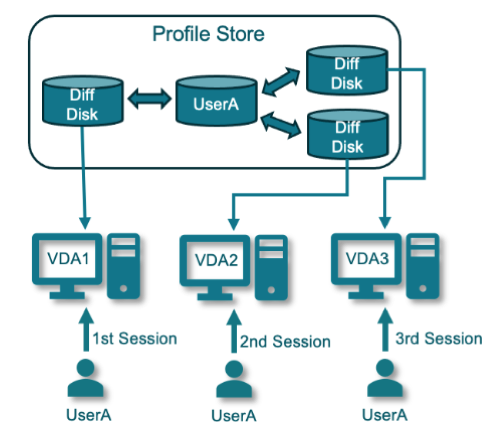
Unlike multi-session access mode generating differencing disks for each session, exclusive access mode directly mounts profile base disk into user session. Users receive Windows temporary profiles in any subsequent sessions and a dialog prompts for users to notify potential data loss.
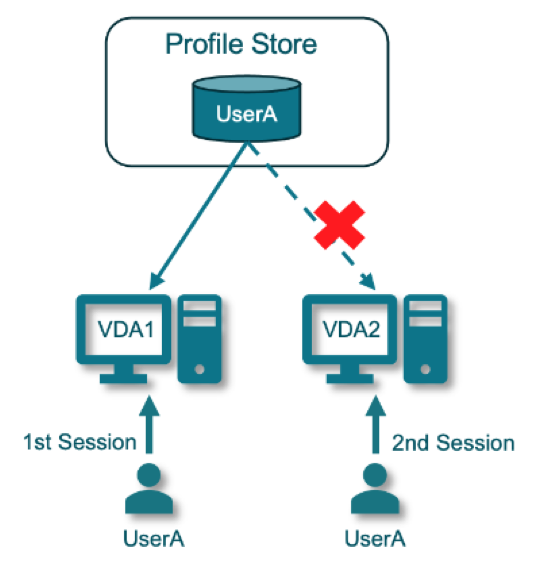
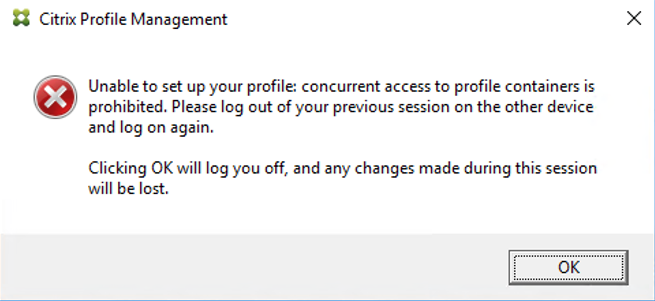
Exclusive access brings additional benefits to Citrix customers:
- User logon and logoff acceleration: Simplified user logon and logoff process eliminates differential disk creation at user logon and data merge at user logoff. User session directly mounts the base disk of the profile container.
- Profile data consistency: The profile disk is exclusively accessed all times preventing end-users from concurrently accessing profile data through multiple desktops. CPM employs the ‘last write wins’ strategy to ensure user data consistency in multi-session write-back mode and it works well in most cases. However, there still are some unintentional ‘last modification’ behaviors that may result in data loss. If your scenario involves single-session usage and data consistency is a top concern, you can opt for exclusive access.
- Storage cost saving: Exclusive access does not rely on the creation of additional differencing disks for each user session. This significantly reduces the requirements for storage planning.
Learn more
In this article, we introduced three CPM container access modes and their corresponding usage scenarios. If you aim to optimize user profile management experience in a CVAD environment, we highly recommend reading through this blog and selecting the most suitable solution. To learn more about Citrix Profile Management, please visit our product documentation.
Disclaimer: This publication may include references to the planned testing, release and/or availability of Cloud Software Group, Inc. products and services. The information provided in this publication is for informational purposes only, its contents are subject to change without notice, and it should not be relied on in making a purchasing decision. The information is not a commitment, promise or legal obligation to deliver any material, code, or functionality. The development, release, and timing of any features or functionality described for products remains at the sole discretion of Cloud Software Group, Inc.