


Manage Citrix DaaS non-domain joined deployments with Citrix WEM service
Previously, Citrix introduced the ability to deliver non-domain joined virtual desktops easily with Citrix DaaS. Admins can choose to deploy non-domain joined desktops to separate environments from your domain-joined systems for security reasons or to have a simpler setup process.
However, in a non-domain joined environment, centrally managing computer configurations and user policies can be challenging since the tools and services you need are typically not provided by the domain service. Citrix Workspace Environment Management (WEM) service offers an easy-to-setup and easy-to-use solution to centrally manage your Citrix DaaS non-domain joined deployments. This saves admins time by not having them manage and configure each desktop manually.
As part of our efforts to provide more efficiency and time savings, we will walk you through the benefits of using the WEM service and show you how to set it up to manage computer configurations and user policies for non-domain joined virtual desktops.
Why choose the Citrix WEM service?
Using the WEM service to manage non-domain joined deployments can provide several benefits:
- Easy to set up: The WEM service provides an integrated workflow with Citrix DaaS for the non-domain joined deployment scenario. You don’t need to enroll the non-domain joined devices manually or set up additional Citrix Cloud Connectors. Just install the WEM service agent alongside the Citrix Virtual Delivery Agent (VDA) in the master image. The process to create a non-domain joined catalog automatically sets up the connection between the created devices and the WEM service. See our document on how to manage non-domain-joined machines.
- Easy to manage: Once set up, the WEM service can provide its full functionality to manage the non-domain joined environment just the same way as any domain-joined environment. You can create different WEM configuration sets for different machine catalogs. You can use the WEM service to optimize computers, configure Group Policy settings, and deliver scripted tasks for automation. You can also centrally gather and view the statistics and insights of your environment and assign various administrative tasks to individual devices on demand.
- Support AD and Azure AD as identity provider: The WEM service supports AD and Azure AD as the identity provider. You can configure WEM actions and group policy settings and assign them to AD and Azure AD identities including users and groups. When a user launches a session to connect to a non-domain joined virtual desktop, the VDA creates a local mapping account for the user. The WEM service automatically detects and applies the configured user actions and settings for the local mapping account. The end user could have the same experience as if they are on a domain-joined virtual desktop.
How to set up non-domain joined catalogs with the WEM service
Let’s walk through how to set up a non-domain joined catalog with the WEM service. You can check this Citrix DaaS document for requirements to create non-domain joined catalogs using Citrix DaaS.
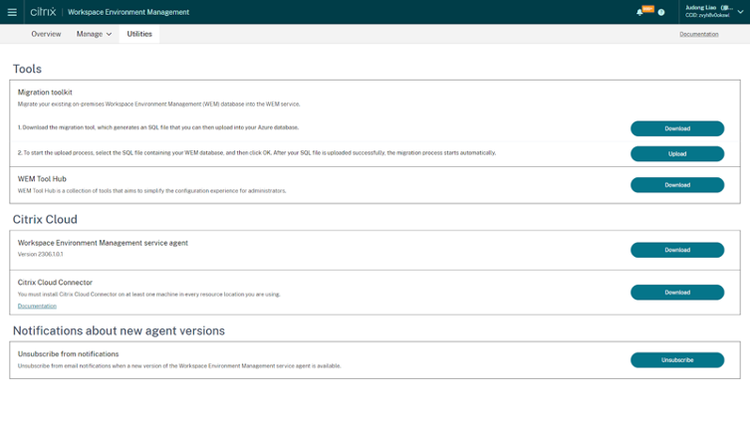
After installing the VDA on the master image, the WEM service agent also needs to be installed. You can sign in to the Citrix Cloud portal and navigate to Workspace Environment Management > Manage > Utilities to download the latest WEM service agent.
The screenshot below showcases the Utilities tab of the WEM management console.
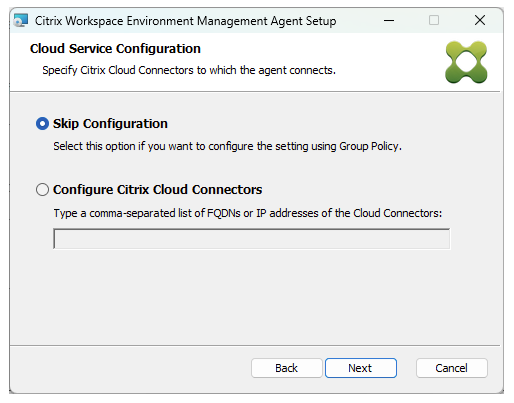
After downloading the WEM agent, install the agent on the master image. When installing the agent, select Cloud Service Deployment > Skip Configuration as shown in the screenshot below.
You can now create a non-domain joined catalog as described in the Citrix DaaS document.
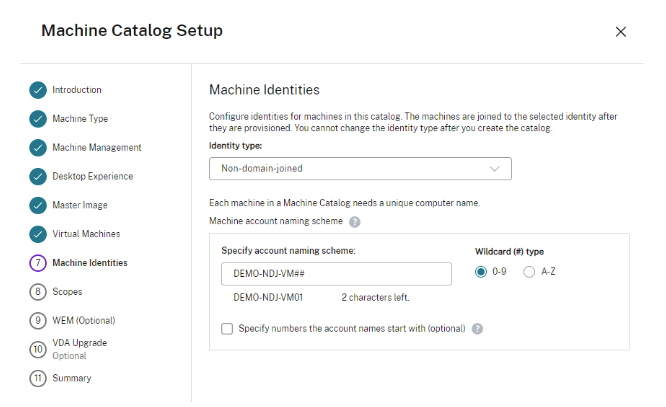
Below, you’ll see where the admin can choose to deploy virtual machines as non-domain-joined when creating a Citrix DaaS Machine Catalog.
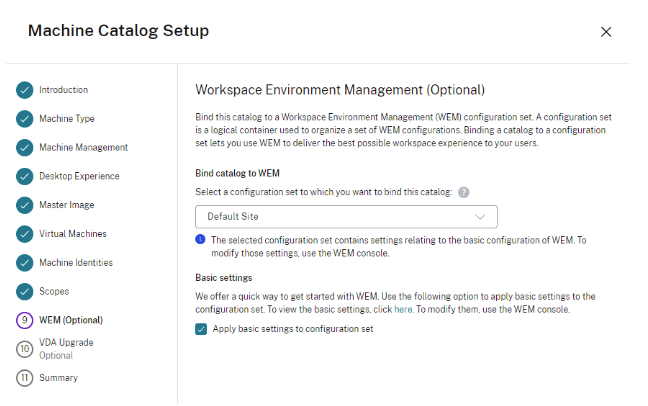
During the steps, you can add the catalog to a WEM configuration set. A configuration set is a logical container used to organize a set of WEM configurations. The created non-domain joined virtual machines will automatically get settings from the chosen WEM configuration set.
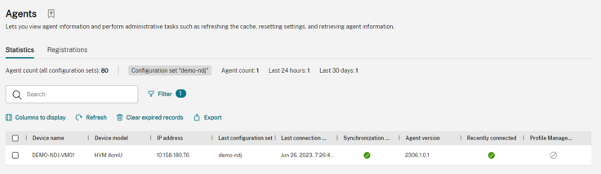
To manage the WEM configurations, you can use the WEM web console. You can navigate to Monitoring > Administration > Agents page to view all the devices managed by the WEM service. Here you can see that the VM previously created has been registered to the WEM service successfully.
Manage non-domain joined deployments with the WEM service
With the WEM service, you can manage various policies and settings for computers and users. As an example, let’s see how to configure Group Policy objects for the non-domain joined devices.
On the WEM web console, go to the Configuration Sets page and select the configuration set which the non-domain joined devices bind to. Under Actions > Group Policy Settings page, you can create or import Group Policy objects based on registry operations or templates. Here we have created an example Group Policy object called demo ndj gpo which configures the Windows Update settings for the computer.
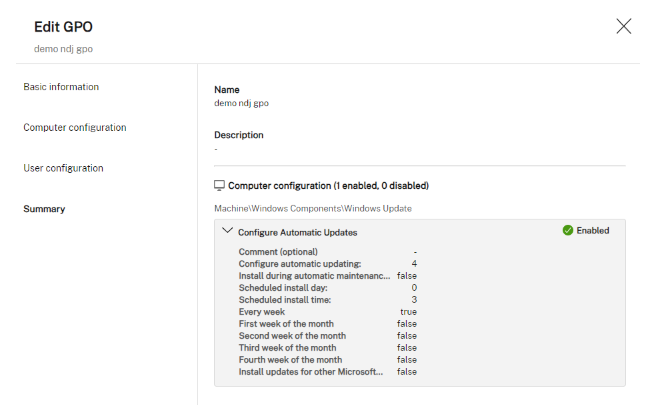
After creating the Group Policy Object, simply assign it to Everyone to make sure that all computers in the configuration set get the object. If you want the object to be restricted to certain devices, you can use the WEM filters and conditions which allow you to filter devices based on catalogs, delivery groups, IP addresses, machine names, and more.
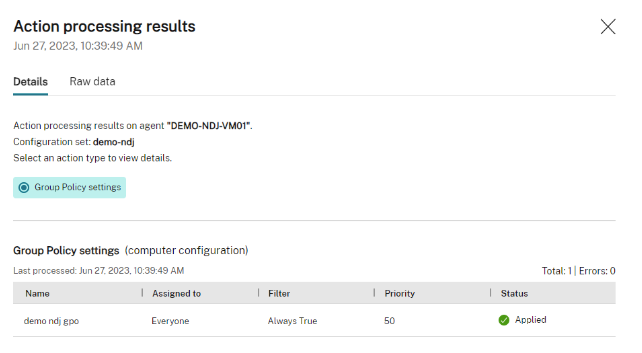
In addition, the WEM service can gather the processing results of the configured Group Policy objects on each individual device so that you can easily view them on the WEM web console. Go to Monitoring > Reports page and you can find the reports uploaded by the agent computers. Here you can see that the example Group Policy object demo ndj gpo has been successfully applied.
Manage user policies for non-domain joined deployments
Citrix DaaS uses local mapping accounts on the non-domain joined virtual desktops when domain users launch sessions. Managing user policies for such local mapping accounts could be tricky. Luckily the WEM service has integrated with Citrix DaaS to recognize these local mapping accounts automatically.
On the WEM web console, you can create WEM actions and assign them to AD and Azure AD identities. As an example, here we have created a WEM action to map a network drive and assigned it to an AD user:
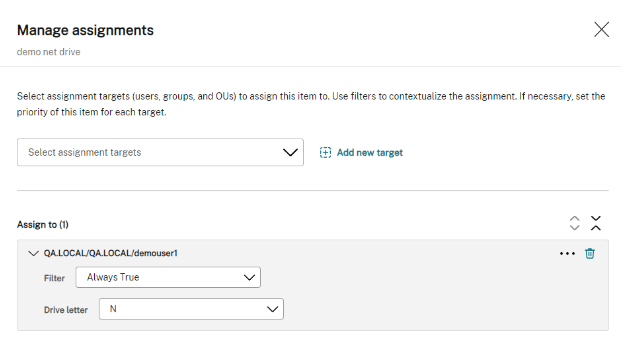
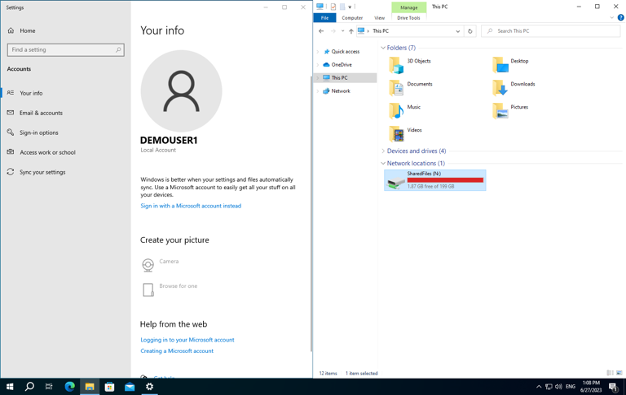
When launching a user session on a non-domain joined device, the WEM service automatically detects the associated domain user of the local mapping account and applies the assigned WEM actions so that the local user could get the same experience as the domain user. Here you can see that the example network drive has been processed for the local mapping account.
Summary
As part of our efforts at Citrix to continuously improve user experience while providing value, time savings, and cost savings to the IT admin, the integration between Citrix DaaS and the Citrix WEM service has made setting up and managing non-domain joined deployments easy. Ready to explore more? Check out the documentation on the WEM service, non-domain joined deployments and the WEM web console, and give this solution a try!

Disclaimer: The development, release and timing of any features or functionality described for our products remains at our sole discretion and are subject to change without notice or consultation. The information provided is for informational purposes only and is not a commitment, promise or legal obligation to deliver any material, code or functionality and should not be relied upon in making purchasing decisions or incorporated into any contract.