


PVS Catalogs Made Easy with Citrix DaaS Provisioning
This blog was co-authored by Jitao Hou, Lead Product Manager, Citrix BU.
Citrix DaaS has recently launched a new Technical Preview feature, Creating Citrix Provisioning catalogs in DaaS, in Web Studio. With this new feature, customers can create Citrix Provisioning (PVS) machine catalogs on Azure directly in DaaS Studio with just a few clicks.
Background
Citrix provides two provisioning solutions for creating machine catalogs Citrix Provisioning (PVS) and Machine Creation Services (MCS). While creating a catalog using Citrix Provisioning requires manual setup on the hypervisor or cloud or using the Citrix Virtual Apps and Desktops (CVAD) Setup Wizard in the PVS console, the new feature allows customers to create a PVS catalog directly in DaaS Web Studio. This new feature offers an easy and integrated solution for creating machine catalogs.
Benefits
- Simplified Provisioning Process: With the new Creating Citrix Provisioning catalogs in DaaS feature, customers can easily create a Citrix Provisioning catalog using the same consistent user interface. This makes the provisioning process much more efficient and less time-consuming.
- Integration with DaaS Studio: The new feature is fully integrated into DaaS Studio, making it easier for customers to manage their machine catalogs and virtual desktops in one place.
- Increased Flexibility: By offering both MCS and PVS provisioning options, Citrix DaaS provides customers greater flexibility to choose the option that best fits their needs.
Steps to Create a Citrix Provisioning Catalog
To create a Citrix Provisioning catalog using the new DaaS Studio Full configuration interface, follow these simple steps:
- Go to the Machine Catalog Setup wizard.
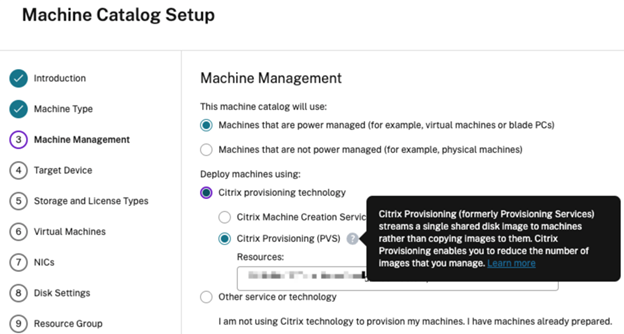
- On the Machine Management page, select Citrix Provisioning technology and then select Citrix Provisioning Services (PVS).
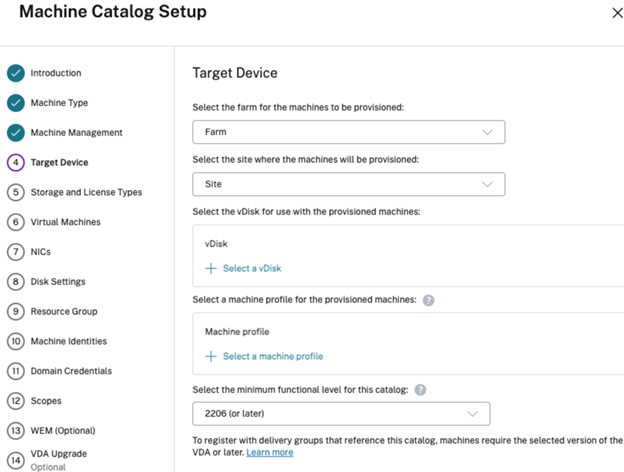
- On the Target Device page, select the target PVS farm and site and choose the vDisk and machine profile for the provisioned machines.
- Follow the remaining steps of the wizard to complete the creation of your Citrix Provisioning catalog.
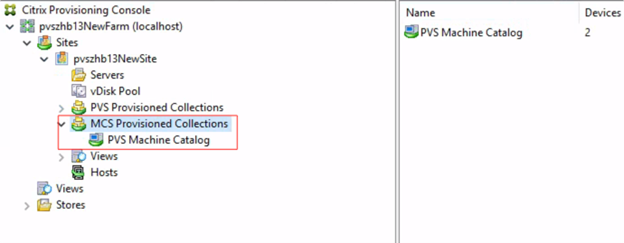
Once the catalog is created, customers can view two types of collections in the Citrix Provisioning console — PVS Provisioned Collections and MCS Provisioned Collections. In the MCS Provisioned Collections, customers can see the Citrix Provisioning catalog created using the new DaaS feature.
Please visit the product documentation for more details.
Looking Ahead — The Future of MCS Provisioning PVS Catalogs in Citrix DaaS
With the new Creating Citrix Provisioning catalogs in DaaS feature, it will become possible for PVS to leverage many of the features MCS has added to hypervisor support, especially on public clouds. For example:
- New Identity management capabilities: supporting Hybrid Azure AD and Azure AD
- On-Demand provisioning
Furthermore, Citrix will provide better support since both PVS and MCS use the same API.
Going forward, the new Creating Citrix Provisioning catalogs in DaaS feature will support more platforms and PVS will benefit from the advanced features which MCS offers today:
- Expand Hypervisor support: support vSphere, Nutanix Cloud Clusters, Google Cloud, XenServer, Hyper-V, etc.
- New Identity Management: support Hybrid Azure AD and Azure AD.
- Enhanced Azure Feature: support CMEK, creating resource group.
- On-Demand Cache Disk Management: support on-demand creation and removal of cache disks.
Create Citrix Provisioning Catalogs with Ease
This new Creating Citrix Provisioning catalogs in DaaS feature in DaaS Studio offers a simple and integrated solution for creating Citrix Provisioning catalogs. With just a few clicks in DaaS Studio, customers can create a Citrix Provisioning catalog easily. This feature simplifies the process of creating machine catalogs and saves time and effort. Go ahead and try this new feature and create your Citrix Provisioning catalog with ease!
Disclaimer: The development, release and timing of any features or functionality described for our products remains at our sole discretion and are subject to change without notice or consultation. The information provided is for informational purposes only and is not a commitment, promise or legal obligation to deliver any material, code or functionality and should not be relied upon in making purchasing decisions or incorporated into any contract.