


What’s new with Citrix — March 2023
This year has already been big for Citrix! With a renewed focus on hybrid deployments and meeting organizations where they are in their cloud journeys, we’ve brought you a ton of new innovations and updates already.
First off, we introduced Citrix Universal subscription at our Destination: Hybrid event. This new subscription offers the ability to manage and deploy resources on premises, from the cloud, or in a hybrid deployment with no pressure to move. At the event, we also announced a number of new on-premises and cloud innovations we plan to roll out in 2023. Lastly, we are excited to announce that our latest on-premises current release, Citrix Virtual Apps and Desktops 7 2303, is now generally available!
Citrix is committed to enhancing the user and admin experience, regardless of how your deployments are configured and from where resources are being accessed. Our renewed product focus centers on your organization gaining:
- Operational Efficiency
- Flexibility and Choice
- Security and Compliance
- Enhanced User Experience
Below, we detail new and exciting features released in the past few months that will help drive your business forward and deliver for your bottom line. By grouping the announcements in the sections listed above, we are looking beyond what is segmented as cloud and on-prem and taking a complete look at what the Citrix platform can do for you. Let’s jump right in!
Improving Operational Efficiency
Introducing the Citrix Universal Subscription
A huge step Citrix took this year in supporting organizations’ needs was delivering the Citrix Universal subscription. After many discussions and iterations on our licensing, we are now delivering this option to bring you the ability to deploy workloads on premises, in the cloud, or in a hybrid environment with a single license. We know that your enterprise environments are complicated, and you may need to keep some resources on premises to remain compliant. But you also want the ability to burst to the cloud and expand as needed for seasonal workforces or contractors. Citrix Universal subscription makes this possible.
Citrix Universal subscription improves operational efficiency by allowing admins to work from the management locations they choose. You can deploy on-prem, public cloud, IT-managed cloud, or hybrid workloads from the on-prem or cloud Citrix management consoles. Your environment is truly customizable to fit your needs, and you have no time pressure to move to the cloud. For more details on the Citrix Universal subscription, take a look at the FAQ section of our Citrix Universal subscription blog post.
We introduced the Citrix Universal subscription and re-introduced Citrix at our Destination: Hybrid event. There are so many exciting features coming this year to continue to enable you on your hybrid journeys. Below is the video showcasing Sridhar Mallapudi, Citrix General Manager, and Calvin Hsu, Vice President of Product Management, discussing all of the latest news and updates from Citrix.
Bringing More to On-Prem with Citrix Virtual Apps and Desktops 7 2303
Citrix is committed to continuous on-premises product releases so organizations can get the latest on-premises features and functionality. That’s why we are excited to introduce the new capabilities in the Citrix Virtual Apps and Desktops 7 2303 current release! This release includes a number of HDX, Citrix Studio, and MCS enhancements that we will take a closer look at in the sections below. It also includes VDA enhancements like TLS 1.3 support, the ability to browse for apps to add in Studio, and support for MAK activation.
Streamlined Management with Web-Based Citrix Studio On-Prem
With the release of Citrix Virtual Apps and Desktops 2303, we are also delivering the long awaited Citrix Web Studio for on-prem. This offers a web-based management experience with the same interface as the Studio console within Citrix DaaS. This is incredibly exciting for organizations leveraging hybrid deployments because it closes the feature gap between on-premises and cloud deployments. Whether you are delivering resources from on-prem, hybrid, or cloud deployments, you now have a unified management experience. Additionally, this release provides developers with a set of REST APIs they can leverage to automate the management of resources within Citrix Virtual Apps and Desktops deployments.
See it in action below!
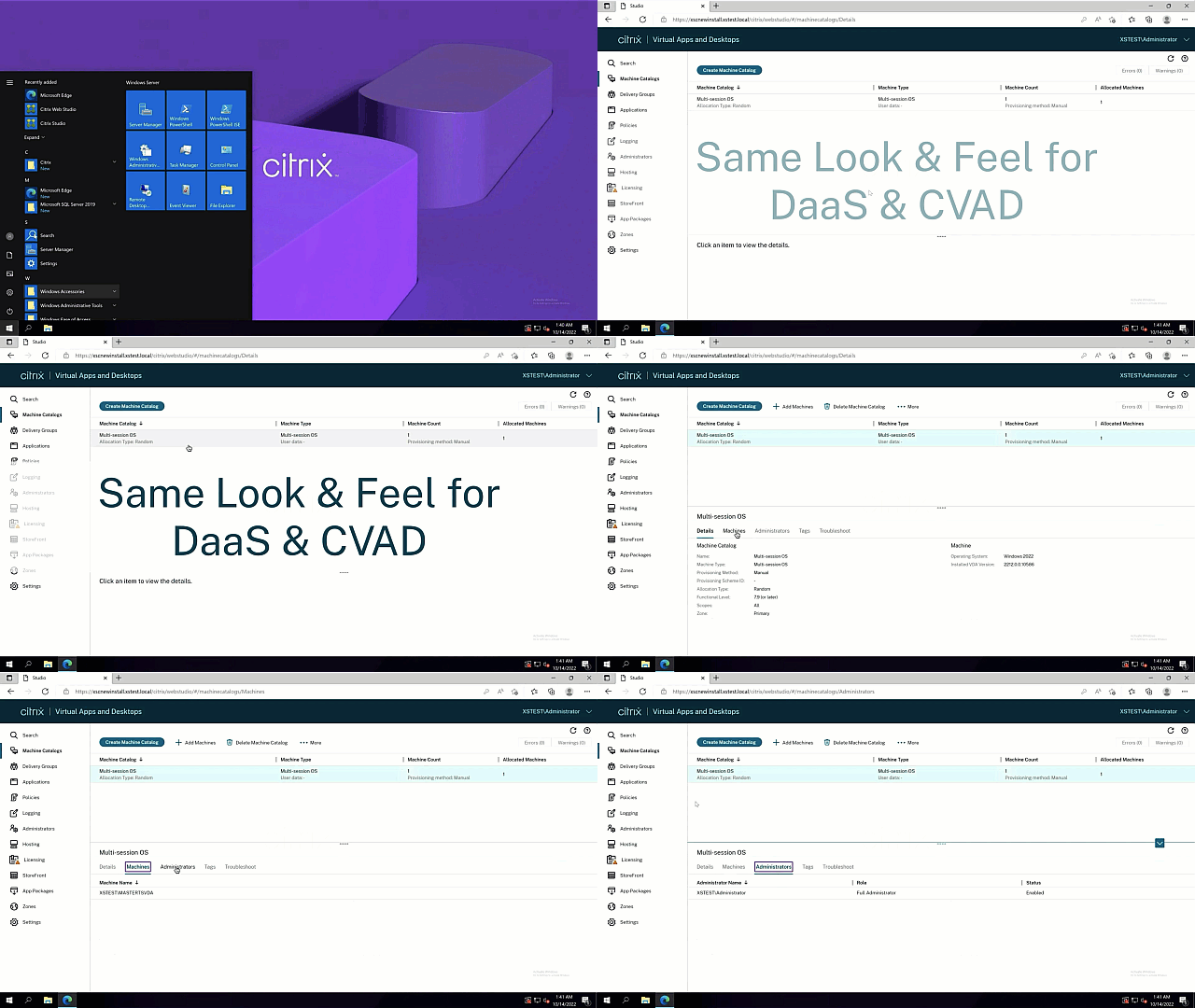
With this release also come new capabilities within Web Studio. The features below improve the admin experience and help streamline management:
- Support for configuring session roaming: PowerShell used to be the only option to configure session roaming for applications and desktops. You can now do that using Web Studio for a better management experience.
- Preserve provisioned VM when power cycling: We’ve added a setting — retain VMs across power cycles — to let you preserve a provisioned VM when power cycling in Azure environments. This setting helps improve performance.
- Proxy mode for Web Studio: Previously, the Web Studio console had to communicate with both the Web Studio server and Delivery Controllers when managing sites. With proxy mode, the Web Studio server is now a proxy for Delivery Controllers, making it the only access point for the Web Studio console and simplifying that process.
Automation and Cost Savings with the Citrix ITSM Adapter for ServiceNow
The Citrix ITSM Adapter for ServiceNow has been an incredible tool leveraged by organizations worldwide to automate and streamline helpdesk tickets for session resets and more. Citrix and ServiceNow continue to save organizations money by automating session reset issues. The ITSM adapter both improves the user experience and eases the main burden. And the great news is, we are constantly adding new features and functionality to the service, including:
- Integration with Citrix Cloud Health Dashboard: Organizations can now see ITSM status and uptime on status.cloud.com alongside the cloud platform status.
- Import VDA Data from Citrix DaaS on Demand: Data can now be imported as needed on demand instead of the data being pulled only once every morning, improving admin visibility.
- Alert and Notification Data Retention Policy: Organizations can define how much alert data they want to retain so they don’t have to pay for extra storage space. With the retention policy, the Citrix ITSM Adapter plugin will clean up the alerts and notifications automatically after expiration
Simulate Sessions with Policy Modeling for Citrix Cloud
To continue to improve operational efficiency and bring feature parity to cloud and on-premises Citrix deployments, we have introduced Policy Modeling to Citrix DaaS! This capability is extremely valuable for admins to model and visualize policies so they can know what users are experiencing first-hand. Specify users, computers, and filters in the wizard and you will receive an easily exportable Resultant Set of Policies (RSoP).
Take a closer look at Citrix Policy Modeling in action.
Saving Time with the VDA Upgrade Service (preview)
To take advantage of the latest features and functionality, administrators must upgrade VDAs regularly, which can often be a manual or time-consuming process. With VDA upgrade service, available with Citrix DaaS entitlements, admins can now quickly push VDA upgrades to individual persistent machines, remote PCs, and entire machine catalogs in minutes via Web Studio or PowerShell. This time-saving feature supports any cloud or hypervisor, as well as non-domain joined machines, AAD joined on top of AD-joined machines, and Citrix HDX Plus for Windows 365 VDAs, as long as the catalog is persistent.
Bringing More Functionality to the Citrix Cloud Platform
We also continue to add capabilities to the Citrix cloud console itself to enhance operational efficiency. The past few months have been exciting for the Citrix cloud platform team, who have added the following capabilities:
- SSO to Azure AD When Using FAS: It’s common to implement Azure Active Directory (AAD) with synchronization between your AD and AAD, which creates hybrid identities for both users and computers. FAS can then achieve SSO to AD. Previously, it was not clear how to achieve SSO to AAD within the session. Take a closer look at how to configure AAD and FAS to achieve SSO to AAD.
- Role Scope Pair Updates for Admin Page: We are transforming the design of role/scope pairs in Identity and Access Management (IAM). Instead of being presented as a single list, the roles and scopes can be selected as primary and secondary options. This model presents a clearer format for assigning administrator permissions, improves load performance, and reduces the number of clicks needed when assigning permissions.
- Admin Group Support: We have now added Administrator group support for the general functions of the Citrix cloud platform. We are improving the functionality for enterprise deployments that manage their admins via groups.
Delivering Greater Flexibility and Choice
Citrix HDX Plus for Windows 365
This quarter we announced the general availability of Citrix HDX Plus for Windows 365. This integration has been long anticipated by organizations leveraging Citrix and Microsoft. Citrix HDX Plus enhances your Windows 365 Cloud PCs, with its high-definition experience, integration with third-party solutions, support for thousands of devices and peripherals and added layers of security, providing great experiences for IT admins and users alike.
To take advantage of Citrix HDX Plus for Windows 365, you will need a Citrix DaaS Standard for Azure, Advanced Plus, Premium, or Premium Plus entitlement. Learn more about integrating Citrix HDX Plus for Windows 365.
Reduce Storage Costs in Azure Environments
Looking to cut down your storage costs in Azure environments? We recently introduced a feature designed to help you optimize storage costs in Azure environments. When you shut down a virtual machine (VM), you can now seamlessly switch the storage type of a managed disk to a lower tier using the StorageTypeAtShutdown custom property.
By taking advantage of this functionality, the storage type of the disk will automatically change to the chosen lower tier when the VM is shut down. Once you power the VM back on, the storage type reverts to its original setting as defined by the StorageType or WBCDiskStorageType custom property. This feature can lead to up to 50 percent savings on storage costs, providing you with an efficient way to manage and allocate resources in Azure environments.
Improved Functionality with Google Cloud
Building on our purpose-built Citrix DaaS for Google Cloud solutions released last year, you can now download a Citrix-prepared Rocky Linux multi-session VDA from the Google Cloud marketplace, as well! Additionally, available in public preview, you can now configure Google Cloud Identity support for admins and end users or save time with our new Quick Deploy feature for Citrix DaaS for Google Cloud.
Greater Deployment Choice with Linux VDA Enhancements
The Linux VDA continues to be a great option for developers and users with graphics-intensive applications. Every quarter we consistently gain feature parity between the Linux and Windows VDAs. The Linux team has been hard at work to deliver:
- Support for REHL 8.7, Rocky Linux 8.7, and SUSE 15.4: Keeping up to date with Linux distributions is imperative to delivering the best possible functionality and choice to organizations.
- Mapping Client Printers to Linux VDA Sessions: Previously, only the default printer of a client device could be mapped to a Linux VDA session. Starting with this release, you can map all printers of a client device to a Linux VDA session.
- Dynamic Client Drive Mapping and Client Folder Redirection: Drives attached to the client anytime during a session are now automatically mapped. In addition, this release introduces client folder redirection that lets you redirect a custom portion of a local drive on the client to the session dynamically.
Enhancing Security and Compliance
Better Auditing with Citrix Session Recording
Citrix Session Recording has been a security staple for Citrix admins for years. It is an incredible resource to secure, troubleshoot, and audit user environments seamlessly. In a recent blog post, Citrix CTP Shane Klienart discussed a customer scenario where the pause/resume feature inside of session recording helped streamline admin reviews of user sessions and aided thoroughly with keeping customer environments compliant. We continue to add features across our on-premises Session Recording and Session Recording service:
- Scheduling Cloud Client Upgrades: Within Session Recording service, you can now configure the cloud client to disable automatic upgrade, enable automatic update with preferred time window, or force immediate upgrade
- Notify User Before Taking Response Action: In on-prem Session Recording, the user gets a notification before they are logged out or locked out of a session that is friendly and decided by the admin.
- Fine-Grained ICLDB Archive/Delete Command: In on-prem Session Recording, organizations can now easily archive and delete recordings. Admins can also review the recordings instead of the time-consuming process of the program re-reading all of the recordings to save time and ease management.
Continued Capabilities in App Protection
As we continue to enhance the capabilities of App Protection beyond anti-screen capture and anti-keylogging, we are bringing more power to your secured environments. This quarter we introduced anti-DLL injection within App Protection for Windows users. Citrix Workspace app now ensures no unauthorized dynamic-link libraries (DLL) or untrusted modules get access to the session. If any untrusted module gets injected during a session, the Citrix Workspace app detects such intervention and stops the module from loading. Additionally, if any untrusted or malicious DLL is detected before the session launch, app protection blocks the session launch and displays an error message.
Enhancing Visibility with Citrix Analytics for Security
Quarter after quarter we continue to deliver vital features and functionality to Citrix Analytics for Security. Some of the biggest new enhancements are:
- Uncover VDI and DaaS Data Risks with In-Session Clipboard Monitoring: As hybrid is becoming the new normal, new risks arise looking at data exfiltration possibilities to consumer-grade SaaS solutions. Citrix Analytics is now providing in-session clipboard activity details, such as type of content and clipboard byte size next to the copy/paste action itself. The screenshot below is an example of the clipboard monitoring information provided by Citrix Analytics.
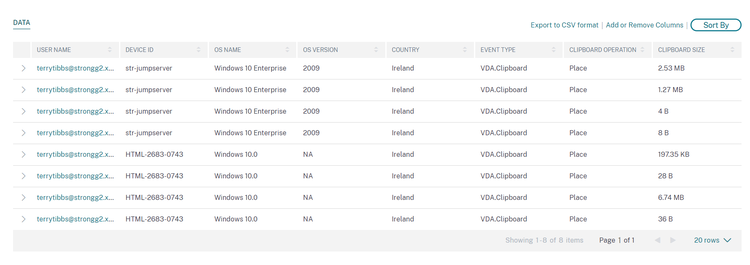
Combined with the risk-driven policy framework of Citrix Analytics, actions such as dynamic Session Recording can be triggered when excessive clipboard usage is detected. Our recent blog post covers this new feature in detail, including configuration guidance.
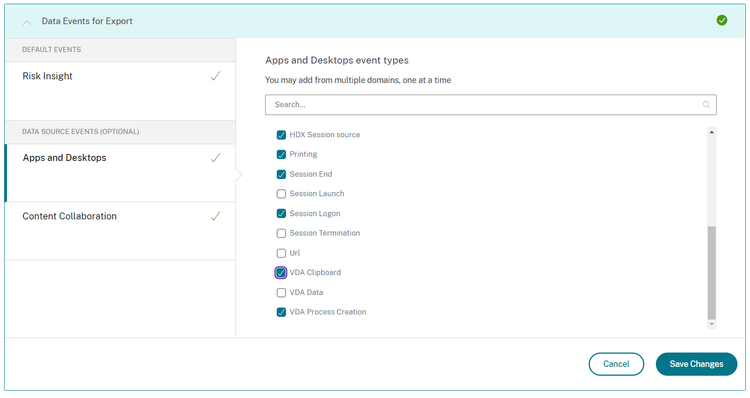
- Export of Data Source Events to Supported SIEM Solutions: With the new export capability of “Data Source Events” within Citrix Analytics for Security, user activity events from Workspace app, Session Recording, on-prem NetScaler Gateway, and other onboarded data sources can now be exported to supported SIEM solutions. This allows the correlation of real-time user activity data with event information from other solutions in place, such as UEM, IDP, or DLP in your existing SIEM tool. This enables you and your security teams to generate user behavior profiles for threat hunting and incident triage. Our recent blog post takes a closer look at the technical details. The screenshot below showcases data event options.
On-Prem Secure Private Access
We introduced Citrix Secure Private Access last year to offer granular web and SaaS security on an enterprise scale. This ZTNA solution has been available only for Citrix DaaS users — until now! We are excited to announce that Citrix Secure Private Access is now available for on-premises deployments, even if they are hosted on premises or in the cloud! This new, purpose-built offering can meet you where you are in your deployment journey by bringing data, control, and management fully on prem to be managed by you. Authentication and federation will also be on prem via NetScaler Gateway.
Take a closer look at Secure Private Access for on premises in our product documentation. Our new Secure Private Access deployment guide also outlines best practices to implement this capability within your environments.
Adaptive Authentication: Device Posture Service
While traditional authentication methods are still an effective way to check the integrity of end users, more is needed to verify if the endpoints coming onto your network are trustworthy.
Without establishing device trust, you risk allowing an unsecure or compromised endpoint to connect to your network, increasing the chances of a potential threat affecting critical corporate resources.
At Citrix, we are committed to the principle of “never trust, always verify.” Establishing device trust by checking the device’s posture is critical to implementing zero-trust-based access. Device posture service is a cloud-based solution that helps establish device trust before allowing an end user to log in and fully integrate with Citrix DaaS and Citrix Secure Private Access service. It enables companies to specify device posture parameters such as operating system version, Citrix Workspace app version, Microsoft Endpoint Manager (MEM) integration, and MAC address that an endpoint must meet to access corporate resources.
The demo below showcases how an admin should configure the Device Posture service:
This video takes a look at the end user experience:
Streamlining the User Experience
Enhanced User Experience with Multimedia, Unified Communications Optimizations
Every quarter our HDX team delivers cutting edge features to enhance the user experience. In this release, we focused heavily on new features for Microsoft Teams to enhance user experience and make your virtual meetings more productive. Let’s dive in to these new capabilities:
- Background Blurring: One of the latest additions is the background blurring feature, which offers users increased privacy and reduced distractions during video calls. By blurring the background behind the speaker, attendees can focus on the presenter without any unnecessary distractions. Users can also choose to substitute their background with one of the standard Microsoft backgrounds, or administrators have the option to create a standard image background, such as a corporate image. This feature is available in Windows 2207, Linux 2212, and Mac 2301 releases.
- Secondary Ringtone: Missing a call due to not hearing the ringtone notification can be frustrating, especially if it results in a missed transaction or sale. The secondary ringtone feature addresses this issue by allowing users to select a second device to play incoming call ringtone notifications. The call will ring through the primary device, such as a headset, and the secondary device, like speakers. With both the headset and speakers playing the ringtone, you’ll be more likely to notice the incoming call and respond promptly. This feature is available in Windows 2203, Linux 2209, and Mac 2209 releases, enabled by a Microsoft soft flag in late March 2023.
- Simulcast: This is a feature designed to improve the video conferencing experience in situations where under-spec client devices or low-bandwidth connections are involved. With simulcast, each client can send multiple video streams to the meeting server (e.g., 720p, 360p), which then sends out the appropriate video stream for each endpoint. This feature eliminates the lowest common denominator problem, where the slowest endpoint would constrain the video resolution for all meeting participants. Simulcast is available in Windows 2303, Linux 2303, and Mac 2303 releases.
Take a look at Optimization for Microsoft Teams in action:
Citrix Analytics for Performance Updates
Employee productivity, retention and satisfaction are a top priority when we develop new capabilities. Citrix Analytics for Performance delivers actionable insights to deliver an optimal experience. This quarter we are giving admins even more insights into their environments for optimization:
- Custom Reports (Preview): One of our most awaited features is now in preview. Custom reports allow you to visualize your self-service search results in reports. These dynamic reports can either be viewed inside Analytics, downloaded as PDF report, or scheduled as PDF report via email distribution to administrators of Citrix Analytics for Performance.
- Anomalous Latency Insights: Like with reports, we constantly improve meaningful insights that are actionable at the same time. One of the most common reports we have seen, are latency insights on session responsiveness and anomalous latency experienced. Instead of manual investigation, we have provided you with a new “Insights” item in the “Baseline” view. The benefit of insights compared to scheduled reports is the on-demand alerting and webhook integration (e.g. to Slack, Teams, or existing workflows).
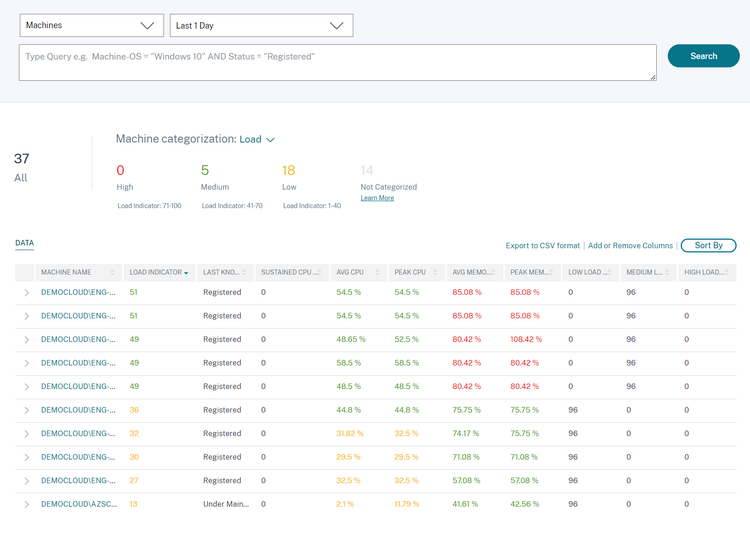
- Understanding Machine Utilization: The journey to hybrid deployments most likely starts with sizing or right sizing machines for the hyperscaler of choice. With this recent innovation, we now help to easily identify machines that are being over- or underutilized and to report this as part of custom reports.
As shown in the screenshot below, underutilized resources and associated counters will appear yellow, while machines in the desired sweet spot of resource consumption are highlighted green. The columns “low-,” “medium-,” and “high-load” indicators are 15-minute interval counters, which you can use to build self-service search results or custom reports. This allows you to summarize the overall resource utilization on a daily, weekly or monthly basis.
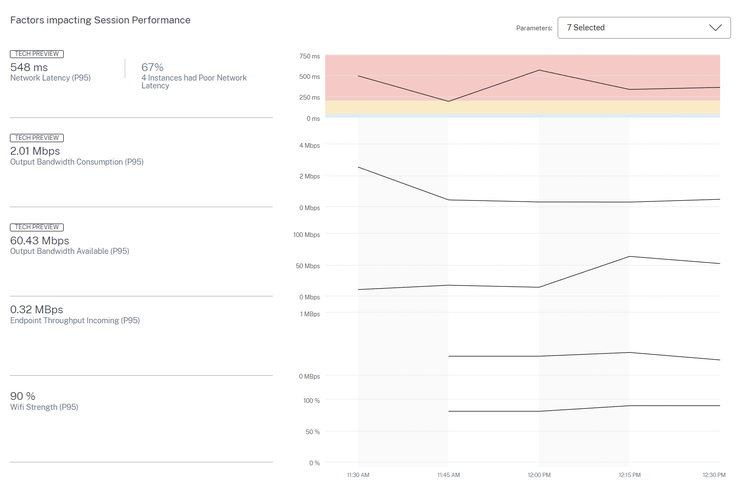
- Endpoint Telemetry in Session Timeline: Citrix is committed to enhancing the user and admin experience. Because endpoint telemetry is crucial to determining factors that impact user experience, we have ensured that the data points are easy to access for help desk admins – directly from within Citrix Director as you can see below!
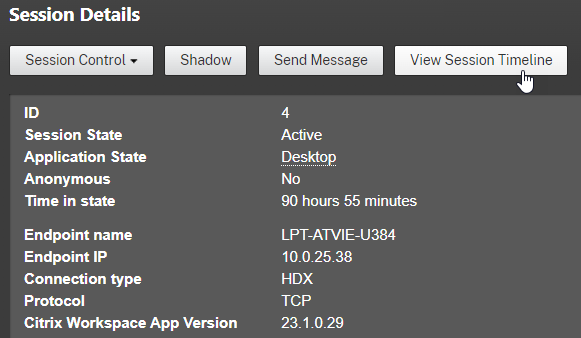
This allows help desk admins to instantly look into Citrix Analytics for Performance, to identify bottlenecks affecting the user experience and provide guidance, such as getting closer to the WiFi access point. The endpoint telemetry data is collected and delivered from Citrix Workspace app to Citrix Analytics, which allows collection from BYOD and unmanaged devices in remote locations without any additional agent installation. Take a look at our PoC guide and connect your on-premises Citrix Virtual Apps and Desktops site, or Citrix DaaS environment, after activating a free trial on citrix.cloud.com.
Bringing More to Citrix Workspace App
The Citrix Workspace app team is continuously delivering new capabilities across Windows, Mac, Linux, iOS, and Android devices. Many users also access their necessary Citrix resources through our Citrix Workspace web client. Delivering streamlined access to resources on any device is what we do, and we are continuing to improve our capabilities.
Earlier this year, we improved the web client experience by delivering the Citrix Workspace Browser extension to streamline app and desktop launches from the web client. This thoroughly improves the virtual desktop launch experience by automatically detecting the user’s locally installed Workspace app and launching the virtual desktop from there.
Additionally, we continue to make great strides with the Citrix Enterprise Browser within Citrix Workspace. This Chromium-based built-in browser is a secure and seamless way for users to access web resources. Admins can add a watermark, restrict copy and paste, and much more within the web session. And the user experience is just like launching a native browser with the ability to open multiple tabs and create bookmarks. We have also introduced the ability to manage the Citrix Enterprise browser from within the Global App Configuration service.
Take a closer look at configuring the Enterprise Browser in the video below!
Learn More
We are starting the year strong with a ton of updates to improve operational efficiency, deliver flexibility and choice, enable security and compliance, and continue to streamline the user experience. And we only plan to add more updates from here!
Citrix is committed to meeting you where you are on your journey and give you real-time insights into what we are developing. To get the latest information on upcoming features, take a look at our Citrix Updates page to see granular details about all new and upcoming capabilities. You can also get the latest on-premises updates from our product documentation. Keep an eye out for more exciting news and updates to come!
Disclaimer: The development, release and timing of any features or functionality described for our products remains at our sole discretion and are subject to change without notice or consultation. The information provided is for informational purposes only and is not a commitment, promise or legal obligation to deliver any material, code or functionality and should not be relied upon in making purchasing decisions or incorporated into any contract.