


Citrix TIPs: 5 questions about deploying Citrix ADCs in Azure
As they transition to public cloud providers, organizations everywhere are navigating cloud-native technologies used to support key infrastructure components such as Citrix ADC. With new platforms come new questions that you must answer to help drive a successful deployment.
As a consultant on Citrix’s U.S. Public Sector team, I often work with businesses to design and deploy Citrix ADCs in Azure. In this blog post, I will share the some of the most common questions I get and provide technical guidance for dealing with some of the crucial decision points. (Everything I cover in this post applies to Azure Government and Azure commercial.)
When deploying a production workload in Azure, your Citrix ADCs should always be in a highly available (HA) pair. In short, Azure Load Balancers (ALB) are required when deploying an ADC HA pair on Azure. The lack of a Layer 2 broadcast domain on public cloud providers does not allow the ADCs to operate how they work in traditional on-premises deployments. On a transitional on-premises network, during a HA failover, the secondary ADC would advertise its MAC address as the new owner of a vServer IP address and assume ownership. To provide HA in Azure, an ALB is required to front end the ADCs to determine which appliance is primary.
How many Azure Load Balancers are required?
In typical consulting fashion, the answer is, it depends! The number of ALBs required depends primarily on where, from a networking perspective, users are accessing services from. Two ALBs are usually required for most Citrix ADC deployments — a public and a private ALB. You can find details on the differences in the Azure documentation. At a high level, Azure differentiates public and private ALBs by the type of front-end IP address that can be associated with them.
- Public ALB: Provides the ability to assign a public IP address that is routable over the internet. Most commonly, a public ALB will provide high availability for a Citrix Gateway vServer across the primary and secondary ADCs. Because the Citrix Gateway is commonly accessed externally by users over the internet, a public ALB is required. If the Gateway was accessed only by users on a private IP address space, a private ALB would be used instead.
- Private ALB: For services being accessed by internal users through a private IP address, you must use a private ALB. This load balancer front ends services such as Citrix StoreFront and XML (Cloud Connectors or Delivery Controllers).
One of the most important things to remember is that while you may need multiple ALBs for public and private IPs, the same ALB can support multiple vServers on the ADC. This is done by creating multiple load balancing rules on a single ALB. Essentially, every load balancing vServer on the ADC needs a corresponding load balancing rule on an ALB.
What ADC IP should be configured for the ALB health probe?
As I mentioned earlier, the ALB’s primary purpose is to facilitate HA between two ADCs. The configuration it uses to determine which ADC is primary is very important.
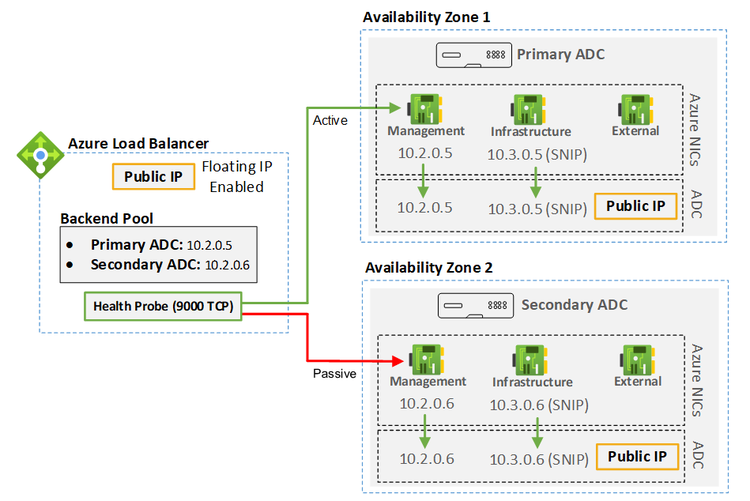
The ADC has built-in functionality to respond to a TCP request on port 9000 only on the primary appliance. The ADC will respond on port 9000 on either the management (NSIP) or SNIP addresses. Please note that the ADC will only provide a response on TCP 9000 when an HA pair has been established. If you are trying to test using an ALB and you have not established an ADC HA pair yet, you will not receive responses on TCP 9000 and the ALB will mark the ADC as down.
There are a few different configurations you can make to get the solution working. However, you should use the ADC management IP address (NSIP) as the health probe for all load balancing rules. I recommend against using the IP addresses of individual vServers hosted on the ADC as the health probe on ALB. While this can be give you a working configuration, it adds unnecessary configurations and increases the complexity of the deployment. For example, if you use the vServer IPs, that means you will have to create health probes for each set of vServers.
Does HDX Enlightened Data Transport (EDT) work through an ALB?
While you can establish EDT sessions through an ALB, some planning and understanding of how ALBs function are required to get the desired outcome. The ALB operates at Layer 4 (Transport Layer) on the OSI model, meaning it supports the TCP and UDP protocols. However, a load balancing rule created on an ALB can only operate at one protocol at a time. This introduces a limitation with the Citrix HDX protocol because it has a built-in fallback mechanism to automatically switch between TDP and UDP (EDT). Because HTTP requests during the authentication use TCP, this always requires at least one TCP-based load balancing rule, which would commonly be used for both authentication and Citrix HDX traffic that commonly go through the same Citrix Gateway vServer.
If you want to provide EDT-based Citrix HDX sessions, you must create separate load balancing rule configured for UDP traffic. It could point to the same Citrix Gateway vServer; however creating a separate DTLS 1.2 Gateway vServer is recommended. This DTLS vServer would be configured on the same IP address as the authentication Gateway vServer.
Should I enable the floating IP setting on a load balancing rule?
Yes! I always recommend enabling the floating IP feature inside the load balancing rule configuration. While you can get the solution without this setting, it will require unnecessary configurations.
Basically, the floating IP features allows the front-end IP address configured on the ALB to be used across both the primary and secondary ADC. As a reminder, the front-end IP is the address that end users will use to access the vServer hosted on the ADC.
So how does this work when you cannot have the same IP assign to multiple instances? This IP address, whether it is a public or private IP, lives only on the ALB. While you must configure the vServer on the ADC with the front-end IP address used on the ALB, the IP is never configured on the Azure network adapter level for the ADC instance.
Using the floating IP features eliminates the need to leverage IPSets. Because deploying Citrix ADC on Azure requires separate IP addresses for every vServer between the primary and secondary, IPSets are needed to enable the secondary ADC to use a different IP address when it becomes the primary. That is a great reason to use a floating IP! The diagram below shows an ADC + ALB configuration using the NSIP as the health probe, along with using a floating IP:
Should you use the Basic or Standard ALB?
I recommend using a Standard Azure Load Balancer for all production workloads. Here’s why:
- Service Level Agreements (SLAs): Microsoft does not provide a guaranteed SLA for Basic ALBs. Standard ALBs include a 99.99 percent SLA. Since all Citrix ADC traffic must first pass through an ALB, you will want to make sure it is as redundant as possible. I recommend reviewing the official Microsoft documentation on the Azure Load Balancer for more information.
- Multiple Availability Zones: If Virtual Delivery Agents or other workloads are in multiple availability zones (AZs) in the same Azure Region, a Standard ALB will enable you to have an ADC HA pair deployed across AZs. This is not possible with a Basic ALB. Also, note that while ALBs can be used across AZs in the same region, you cannot attach Azure Load Balancer to Azure VMs in different regions. Lastly, be sure to select the Zone Redundant ALB when creating it to provide resilience on the ALB level if a AZ failover occurs.
I often get asked is why the Citrix GitHub Azure Resource Manager (ARM) templates deploy a Basic ALB? The ARM templates Citrix provides are only recommended for light production and testing workloads. Because Standard ALBs come with a price tag, it only makes sense to use them in a rapid deployment script. The ARM templates provided are met as a starting point for individuals to build upon for additional functionality.
I use the Citrix-provided ARM templates all the time when rapidly deploying an ADC pair HA in Azure for testing. However, during production deployments, please be aware of the options presented in the ARM templates and their potential design implementations:
- VNet Planning: The Citrix ARM template provides the ability to create a new vNet for Citrix ADCs. Creating a vNet in production deployment is something that should be very thoroughly planned out. It has implications for cost and network design because vNet Peering would be required to reach other components. A vNet can scale to 65k hosts and segregation is more commonly achieved by using subnets inside a single vNet. In short, there will almost never be a technical reason that the ADCs require their own vNet. Disable this option and specify already existing subnets that are created ahead of time and are carefully planned out.
- Naming Conventions: The ARM templates do not allow you to properly name the ADC instances or any of the associated items created such as network interfaces. This is perfectly fine for a proof of concept or testing. However, for production deployment, you need to make sure everything is named appropriately. Renaming items in Azure can be challenging, so you need to do it correctly the first time.
All these concerns can be easily addressed by updating the ARM templates to include variables for ADC names and support for a Standard ALB.
Key Takeaways
Here are a few key points to remember when starting your Citrix ADC journey on Azure:
- Multiple Load Balancing Rule on One ALB: The same ALB can support multiple vServers on the ADC. You just need to create multiple load balancing rules, each with a different front-end IP that references each individual vServer being hosted on the ADC.
- Deploy a Standard ALB: For production deployments, I recommend using the Standard ALB. This provides SLAs from Azure and allows for ADCs to be deployed across multiple availability zones.
- Use a Floating IP: This eliminates the need to create IPSets for each vServer and overall simplifies the ADC configuration.
A big thanks goes out to Juliano Reckziegel, who helped with testing for this blog.