


Quickly import your GPOs to Workspace Environment Management
Group Policy has always been the framework provided by Microsoft to manage security and device settings on Windows endpoints. As part of their day-to-day activities, administrators can visit these Group Policy Objects (GPOs), make changes, and apply them to their domain-joined machines when a security policy change is required.
Many of our customers leverage both Workspace Environment Management (WEM) and Group Policy to deploy their corporate security settings and provide a great user experience. WEM enables customers to pre-configure these policies on Windows devices before their users log on. Since these policies are pre-configured before logon, this results in end users not having the long login times typical with traditional GPO deployment.
With WEM, GPOs can now be easily imported to the administrative console and deployed to Windows endpoints to which the WEM agent is applied.
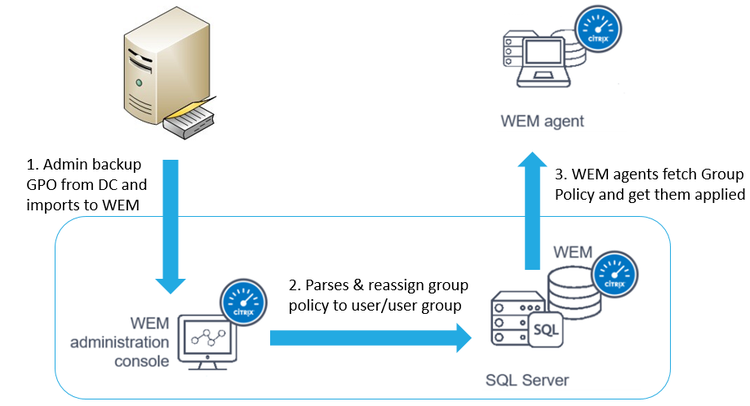
Customers who are using our WEM service or the on-prem 2006 version of WEM will find a new tab available labeled Administrative Templates in the Actions group. Here you can quickly import your Group Policy backup from the Group Policy Management Console. Once imported, all the GPOs will be enumerated, enabling admins to deploy them to users or user groups associated with the WEM environment.
Check out our What’s New with Workspace Environment Management page in Citrix Docs to learn more about this feature.
